TechLabelled diagramPart 3 of 9, How the Internet WorksUpdated 1 October 2026
Data Packets Explained: What's Inside a Packet
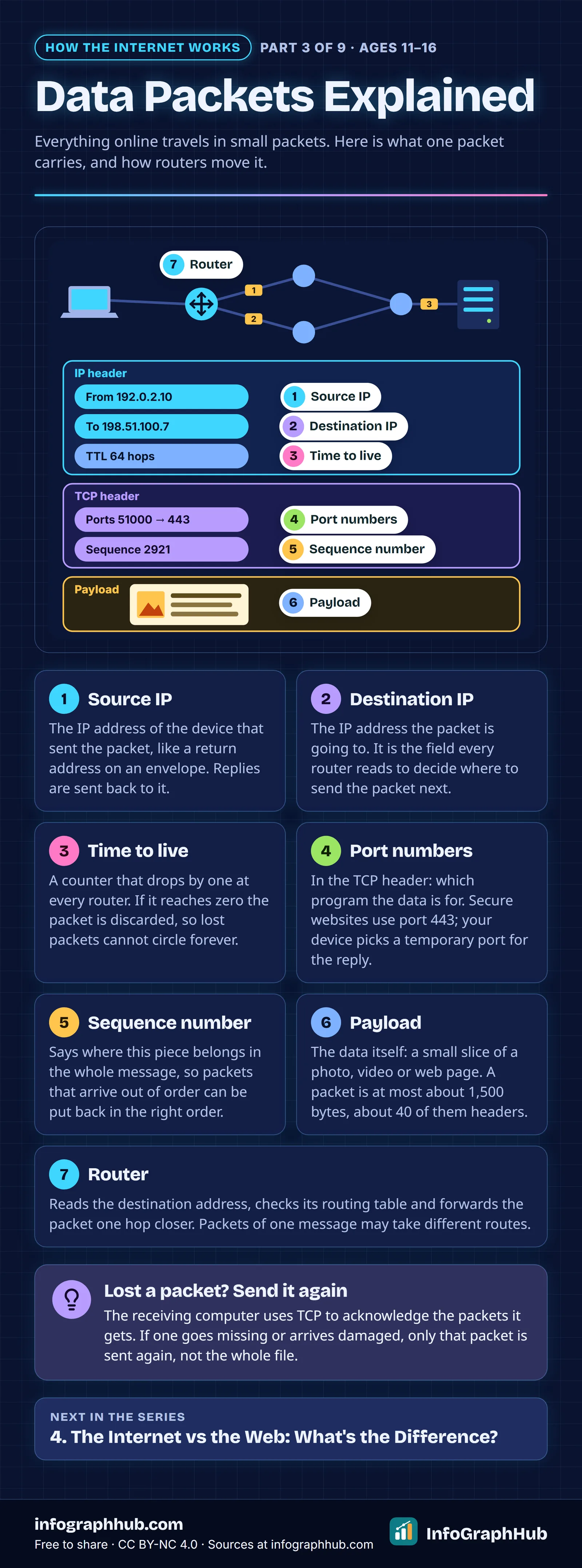
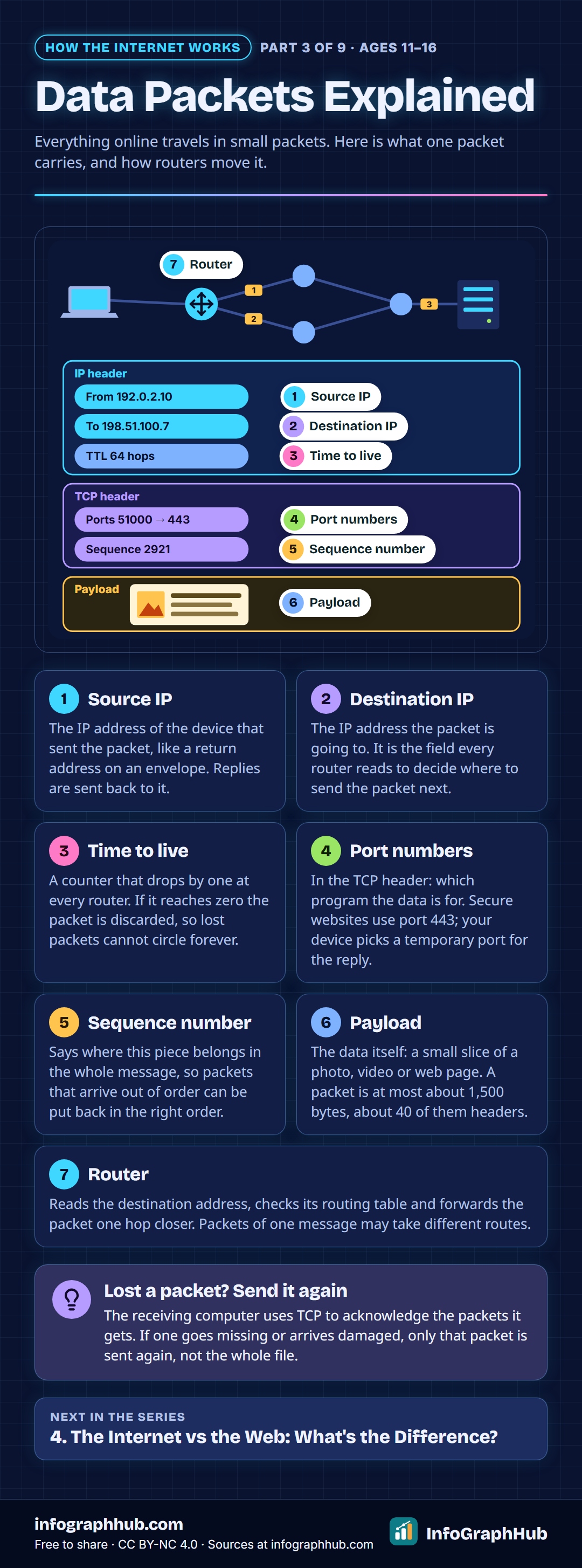
Everything sent over the internet is split into packets. Each packet has headers, like the address on an envelope, with source and destination IP addresses, a time to live, port numbers and a sequence number, plus a payload: a small slice of the data itself.
Interactive
Explore it step by step
7 labelled parts: Source IP → Destination IP → Time to live → Port numbers → Sequence number → Payload → Router. Press play, or choose a number to explore.
Step 1 of 7: Source IP
The IP address of the device that sent the packet, like a return address on an envelope. Replies are sent back to it.
Step 2 of 7: Destination IP
The IP address the packet is going to. It is the field every router reads to decide where to send the packet next.
Step 3 of 7: Time to live
A counter that drops by one at every router. If it reaches zero the packet is discarded, so lost packets cannot circle forever.
Step 4 of 7: Port numbers
In the TCP header: which program the data is for. Secure websites use port 443; your device picks a temporary port for the reply.
Step 5 of 7: Sequence number
Says where this piece belongs in the whole message, so packets that arrive out of order can be put back in the right order.
Step 6 of 7: Payload
The data itself: a small slice of a photo, video or web page. A packet is at most about 1,500 bytes, about 40 of them headers.
Step 7 of 7: Router
Reads the destination address, checks its routing table and forwards the packet one hop closer. Packets of one message may take different routes.
Use this infographic
Free under CC BY-NC 4.0, with credit to InfoGraphHub.
Why data is cut into packets
A photo, a message or a web page is far too big to send across the internet in one piece. Instead it is cut into many small chunks called packets. Each packet travels on its own and the receiving device puts them back together.
This method is called packet switching, and it has two big advantages:
- Sharing. Packets from millions of people can take turns on the same cables and routers, so no single conversation blocks a line.
- Reliability. If a packet is lost or damaged, only that small piece needs to be sent again, not the whole file. And if one route is busy or broken, packets can go another way.
A useful picture is a long letter sent as a pile of numbered postcards. Each card carries an address and a number, so the cards can travel separately and still be read in the right order.
The headers: the address on the envelope
Every packet starts with one or more headers, added by different protocols. Most packets on the internet carry at least two.
The IP header (Internet Protocol) is about delivery. It holds:
- the source IP address: where the packet came from, so replies can find their way back;
- the destination IP address: where it is going, the field routers care about most;
- the time to live (TTL): how many more hops between routers the packet may make;
- the packet's length and which protocol is carried inside, such as TCP.
An IPv4 header has 14 fields in all (one is optional) and is usually 20 bytes long.
The TCP header (Transmission Control Protocol) is about getting the whole message through intact. It holds port numbers, which tell the receiving computer which program the data is for (secure web pages use port 443), a sequence number, which says where this piece fits in the message, and a checksum for spotting damage.
The payload: the data itself
After the headers comes the payload: the actual slice of your photo, video or web page. On most networks a whole packet can be at most about 1,500 bytes. The IP and TCP headers usually take about 40 of those bytes, leaving roughly 1,460 bytes for data.
That makes packets tiny. A 3 MB photo is about 3,000,000 bytes, so it needs 3,000,000 ÷ 1,460 ≈ 2,055 packets at least. A page of plain text might fit in just two or three.
How routers forward packets
A router connects networks together. When a packet arrives, the router reads its destination IP address, looks it up in its routing table (a list of which way to send each group of addresses), and passes the packet on to the next router. Each step is called a hop.
At every hop the time to live goes down by one. If it reaches zero, the packet is thrown away. This stops lost packets circling the internet forever.
Routers handle each packet separately, so packets from the same message can take different routes and arrive out of order. TCP at the receiving end uses the sequence numbers to put them back in order, sends back acknowledgements, and asks for any missing packets to be sent again. Some live video calls and online games use a quicker protocol, UDP, which skips these checks: a late packet is no use in a live call, so it is simply dropped.
Frequently asked questions
What is a data packet?
A packet is a small chunk of a larger piece of data sent over a network. It contains headers, with information such as the source and destination IP addresses, and a payload, which is the data itself. The receiving device reassembles the packets into the original file.
Why is data sent in packets?
So that many people can share the same cables and routers at once, so that only a lost or damaged piece has to be resent, and so that packets can take another route if one path is busy or broken.
What is time to live (TTL) in a packet?
A number in the IP header that goes down by one each time a router passes the packet on. When it reaches zero the packet is discarded, which stops lost packets travelling round the network forever.
How big is a data packet?
On most networks a packet can be at most about 1,500 bytes, including about 40 bytes of IP and TCP headers. That leaves roughly 1,460 bytes of data, so a 3 MB photo is split into over 2,000 packets.

Sources & methodology
Every fact is checked against the sources below. We write original explanations and draw original graphics; no figures are copied from textbooks. Spotted an error? See our corrections policy.
- What is a packet? (Cloudflare Learning Center, accessed 1 Oct 2026)
- What is the Internet Protocol? (Cloudflare Learning Center, accessed 1 Oct 2026)
- What is MTU (maximum transmission unit)? (Cloudflare Learning Center, accessed 1 Oct 2026)
- Packet (glossary) (MDN Web Docs (Mozilla), accessed 1 Oct 2026)
- IP packets (Khan Academy, accessed 1 Oct 2026)
- What is a router? (Cloudflare Learning Center, accessed 1 Oct 2026)
Editorial review pending · Updated
Made by the InfoGraphHub editorial team (how we research and check: editorial and AI policy). First published 1 October 2026, last reviewed 1 October 2026. Found a mistake? Tell the editors.
For teachers: ages and curriculum fit
Ages 11–16 · Grades 6–10 (US) · Years 7–11 (UK) · Classes 6–10 (India)
Embed this on your site
Paste this HTML into your page. Keep the credit line: it is required by the CC BY-NC 4.0 license.
Related infographics


For teachers and parents: new InfoGraphHub resources by email
One short email when new free resources go live. For adults (18+) only. No spam, no tracking in emails, unsubscribe anytime.