TechLabelled diagramPart 1 of 9, How the Internet WorksUpdated 1 October 2026
How the Internet Works: A Network of Networks
The internet is a network of networks. Your phone or laptop joins a home network through a router, your internet service provider links that to other networks, and fibre-optic cables on land and under the sea carry data to servers in data centres.
Interactive
Explore it step by step
7 labelled parts: Your devices → Home router → ISP network → Exchange point → Backbone fibre → Undersea cable → Data centre. Press play, or choose a number to explore.
Step 1 of 7: Your devices
Phones, laptops, consoles and smart speakers connect to a home network by Wi-Fi radio or by cable. Away from home, phones use a mobile network instead.
Step 2 of 7: Home router
Links your home network to the outside world and lets every device share one connection. Its built-in modem sends data along the line to your provider.
Step 3 of 7: ISP network
Your internet service provider runs its own network of routers and cables, and connects it to other networks so you can reach any website.
Step 4 of 7: Exchange point
At an internet exchange point (IXP), many networks plug into shared switches and swap traffic directly, keeping local data local, fast and cheap.
Step 5 of 7: Backbone fibre
High-capacity fibre-optic cables, mostly underground, link cities and countries. They carry data as pulses of light through hair-thin glass strands.
Step 6 of 7: Undersea cable
Cables laid on the sea floor carry almost all data between continents. Near the coast they are buried under the seabed for protection.
Step 7 of 7: Data centre
Servers in data centres store websites, videos and apps and send them out on request. 'The cloud' means servers in buildings like these.
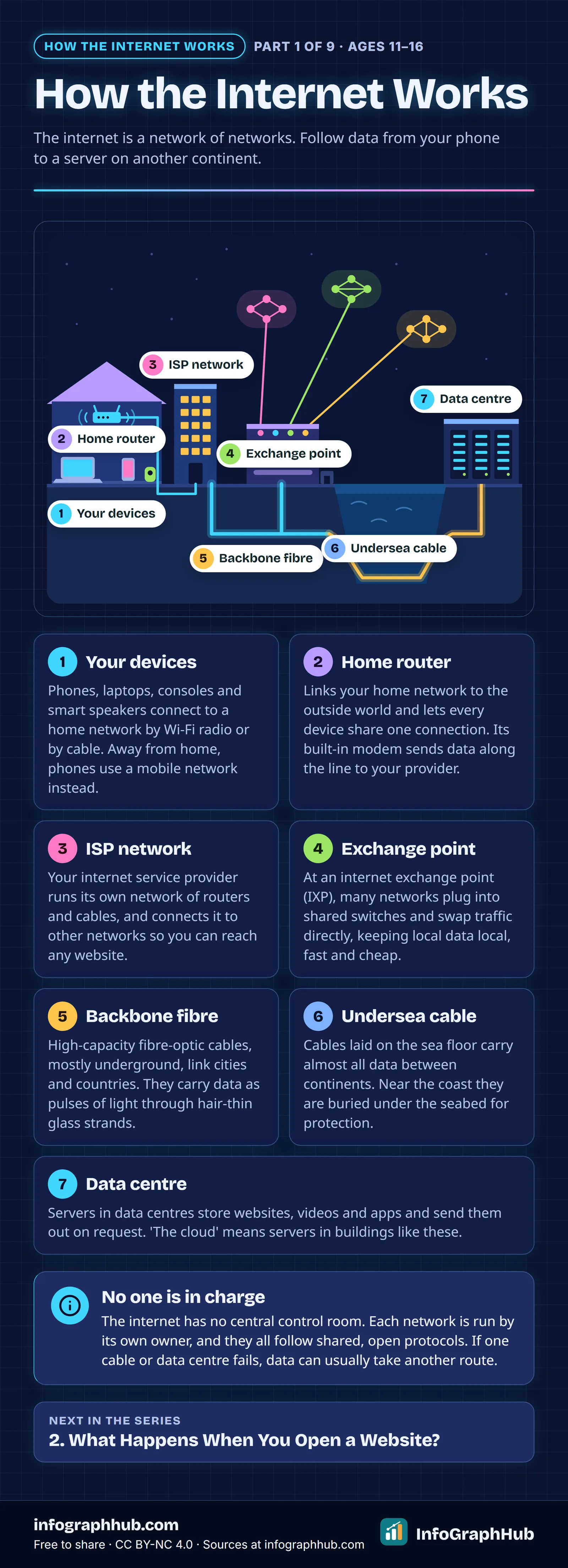
Use this infographic
Free under CC BY-NC 4.0, with credit to InfoGraphHub.
A network of networks
A network is a group of computers and other devices that are connected so they can send data to each other. Your home Wi-Fi is a small network, called a local area network (LAN). A school or a company might have a bigger one.
The internet is what you get when tens of thousands of these networks are joined together. The name itself is a clue: an interconnected set of networks. The networks belong to many different owners, including internet service providers, companies, universities and governments. Because they all agree to follow the same rules, called protocols, a phone in Lagos can exchange data with a server in Stockholm as if the whole thing were one giant network.
Nobody owns the whole internet, and there is no central control room. If one cable or one data centre fails, data can usually find another way round.
Step 1: your device and your home router
Every journey starts with a device: a phone, laptop, games console or smart speaker. It connects to a router, either by a cable or by Wi-Fi, which is a short-range radio link.
The router's job is to pass data between your home network and the outside world, and to let many devices share one connection. The box most homes get from their provider is often a router, a switch and a modem in one case. The modem is the part that turns your data into signals that can travel along the line to your provider, whether that is a telephone line, a cable TV line or a fibre-optic cable. Phones away from home do the same job through a mobile network instead.
Step 2: your internet service provider
Your internet service provider (ISP) is the company that connects your home or phone to the internet. It runs its own network of routers, linked by cables, covering a town, a country or more.
One ISP cannot reach every website on its own network, so ISPs connect to each other. Some pay bigger 'transit' networks to carry their traffic further. Many also meet at internet exchange points (IXPs): buildings full of switches where dozens or hundreds of networks plug in and swap traffic directly. Keeping local traffic local in this way makes connections faster and cheaper. To agree which network can reach which addresses, the networks' routers use a protocol called BGP (Border Gateway Protocol).
Step 3: backbones and undersea cables
Between cities and countries, data travels along backbone links: high-capacity fibre-optic cables that carry data as pulses of light through glass strands about as thin as a human hair.
To cross oceans, these cables are laid on the sea floor. Near the shore they are buried under the seabed for protection, which is why you never see them on a beach; in the deep ocean they rest on the bottom. Most of a cable's length is only about as thick as a garden hose. Satellites help in remote places, but undersea cables carry almost all of the data that travels between continents.
Step 4: servers and data centres
At the far end is a server: a powerful computer that stores websites, videos, messages and apps, and sends them out when asked. Big services run thousands of servers in data centres, large secure buildings full of racks of computers, with their own power supplies and cooling.
When people say a photo is stored 'in the cloud', they mean it is on servers in data centres like these. Popular websites keep copies of their content in data centres around the world, so your request can be answered by one that is close to you.
Why the design works
The internet was built to be distributed: any device or network that follows the shared protocols can join, and no single machine is essential. Devices, servers and whole networks connect and disconnect all the time without stopping the rest. That openness is the reason anyone can start a website or an app without asking a central authority for permission.
Frequently asked questions
What is the internet in simple words?
It is a worldwide network of networks. Home, school, business and mobile networks are joined together by internet service providers and long-distance cables, and they all follow the same rules (protocols), so any connected device can exchange data with any other.
Who owns the internet?
No single person, company or government. It is made of tens of thousands of separate networks run by internet service providers, companies, universities, governments and others, which agree to connect and use shared, open standards.
What does a router do?
A router connects networks and forwards data towards its destination. At home it links your devices to your internet service provider and lets them all share one connection. Inside the internet, routers pass data from network to network until it arrives.
How does the internet cross oceans?
Mostly through fibre-optic cables laid on the sea floor. They carry data as pulses of light. Near the coast they are buried under the seabed; in the deep sea they lie on the bottom. Satellites carry only a very small share of data between continents.

Sources & methodology
Every fact is checked against the sources below. We write original explanations and draw original graphics; no figures are copied from textbooks. Spotted an error? See our corrections policy.
- How does the Internet work? (Cloudflare Learning Center, accessed 1 Oct 2026)
- What is a router? (Cloudflare Learning Center, accessed 1 Oct 2026)
- What is an Internet exchange point (IXP)? (Cloudflare Learning Center, accessed 1 Oct 2026)
- How does the Internet work? (MDN Web Docs (Mozilla), accessed 1 Oct 2026)
- Submarine Cable FAQs (TeleGeography, accessed 1 Oct 2026)
- How It Works (Internet Society, accessed 1 Oct 2026)
- Types of network (KS3 Computer Science) (BBC Bitesize, accessed 1 Oct 2026)
Editorial review pending · Updated
Made by the InfoGraphHub editorial team (how we research and check: editorial and AI policy). First published 1 October 2026, last reviewed 1 October 2026. Found a mistake? Tell the editors.
For teachers: ages and curriculum fit
Ages 11–16 · Grades 6–10 (US) · Years 7–11 (UK) · Classes 6–10 (India)
Embed this on your site
Paste this HTML into your page. Keep the credit line: it is required by the CC BY-NC 4.0 license.
Related infographics


For teachers and parents: new InfoGraphHub resources by email
One short email when new free resources go live. For adults (18+) only. No spam, no tracking in emails, unsubscribe anytime.